Skip to content
PhyStack
Search
Ctrl
K
Cancel
Login
Welcome to PhyStack
Apps
Overview
Apps Overview
Install a Marketplace application
Configure and deploy an installation
Installations
Overview
Installations Overview
Cloning installations overview
Connect a new device to an installation
Connect multiple new devices to an installation
Connect an existing device to an installation
Connect multiple existing devices to an installation
Connect a Tizen device to an installation
Clone an installation
Deploy a build
Delete a build
Disconnect a device from an installation
Delete an installation
Spaces
Overview
Spaces Overview
Create a space
Manage a space
Find a space
Devices
Overview
install-phyos
Overview
Install PhyOS on an x86-64 (Intel/AMD) device
Install PhyOS on Giada DN74
Install PhyOS on Jetson Nano Orin Devkit
Install PhyOS on Advantech MIC-711-ON-3A1
Install PhyOS on Advantech MIC-733-A05A1
Devices Overview
Connect a device to the internet
View all devices in a tenant
View device information
Configure a device
Adjust device screen and audio settings
Monitor a device
Add tunnel links to a device
View installations connected to a device
View peripherals connected to a device
View device analytics
Reboot a device
Delete a device
Install PhyOS
Overview
Install PhyOS on an x86-64 (Intel/AMD) device
Install PhyOS on Giada DN74
Install PhyOS on Jetson Nano Orin Devkit
Install PhyOS on Advantech MIC-711-ON-3A1
Install PhyOS on Advantech MIC-733-A05A1
Peripherals
Overview
Peripherals Overview
Add a peripheral
Configure a peripheral
Delete a peripheral
View all peripherals in a tenant
Users
Overview
Users Overview
Invite a user
Manage pending invitations
Edit user's role and space access
Delete a user
Create a custom user role
Media Library
Overview
Media Library Overview
Create a folder in the media library
Add files to the media library
View files in the media library
Delete files and folders in the media library
Channels & Segments
Overview
Channels & segments overview
Add a new channel
Add a segment to a channel
Manage channels
Tags
Overview
Tags Overview
Create a new tag
Edit tags
Delete a tag
QR Codes
Overview
QR Codes Overview
Create a QR code
Use QR codes and short URLs
Edit a QR code
Delete a QR code
Products
Overview
Products Overview
Integrate products using Google Product Feed
Import products using Excel files
Create a product manually
Edit a product
Delete a product
Create a category manually
Edit a category
Delete a category
Alerts
Overview
Alerts Overview
Create an alert rule
Create an analytics alert
Create a notification recipient group
Edit an alert or notification group
Delete an alert or notification group
Networking
Overview
Networking Overview
Add a whitelist rule
Edit a whitelist rule
Delete a whitelist rule
Allow all connections
Network Infrastructure Requirements
Billing
Overview
Billing Overview
View billing details
Change tenant and support plans
View pricing details
View and download invoices
Tenant Settings
Overview
Tenant Settings Overview
Change tenant settings
Adjust tenant branding
Configure checkout and payments
Managed Tenants
Overview
Managed Tenants Overview
Create a managed tenant
View managed tenants
Edit a managed tenant
Delete a managed tenant
Additional Explanations
Overview
What is the PhyStack Marketplace?
What is the difference between Apps and Installations?
What is an installation group?
What are global settings and settings overrides?
What are content tags?
What are content variant tags?
What are segments?
What is an External ID?
What is the difference between Google Product Feed and Google Local Inventory?
PhyStack Device Provisioning, Authentication, and Network Communication
Glossary
What's New
Login
Delete a tag
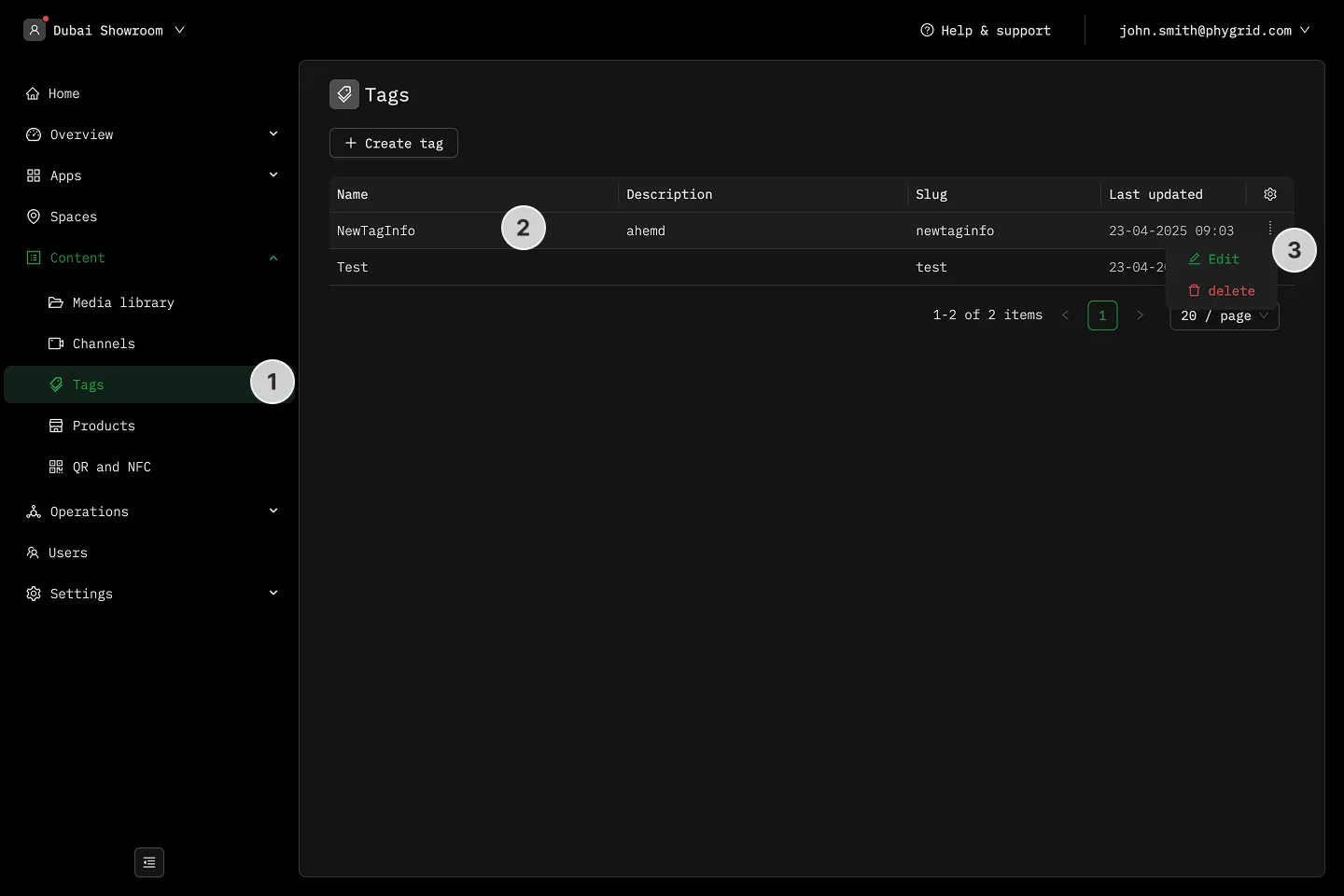
How to manage tags
Section titled “How to manage tags”
Navigate to the
Tags
section
Find the tag you want to manage
Click on the
More (···)
button next to the tag
Select
Delete
to remove the tag